
How I run Facebook ads to get leads for Pilates studios
 Written by Benjamin Boman · · 13 min read
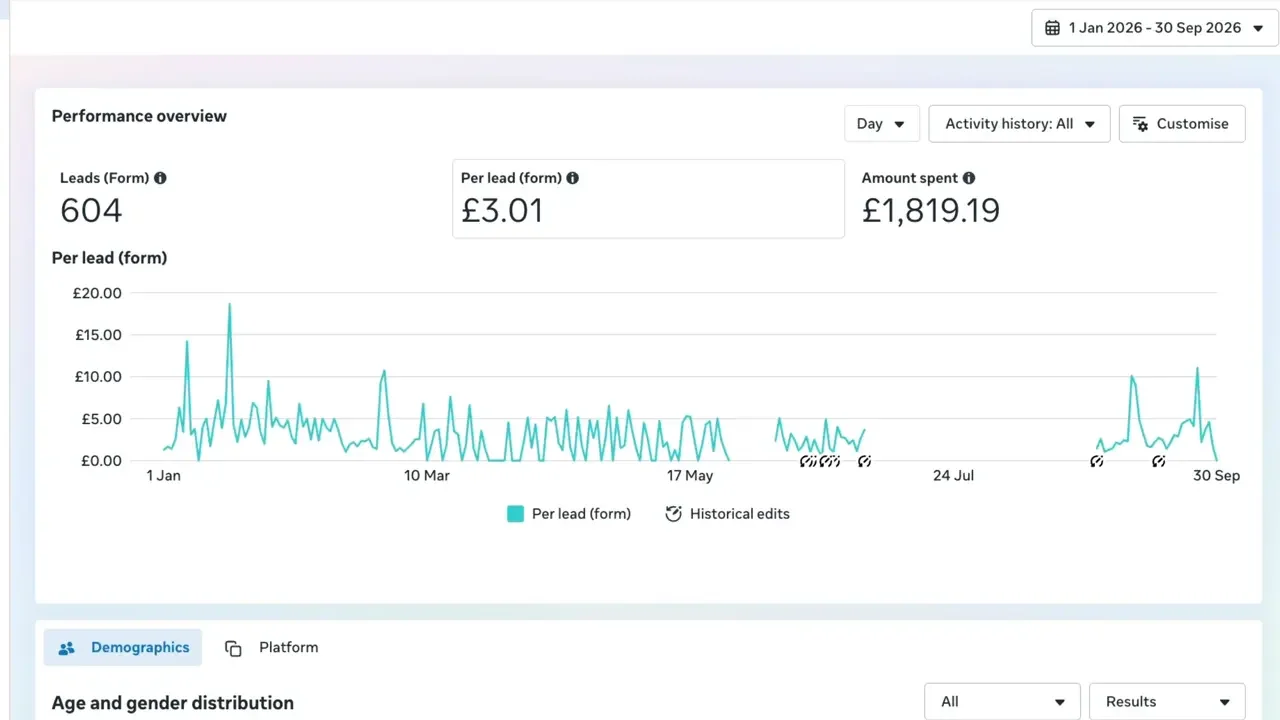
This is the exact playbook I used to help a Pilates studio get 604 leads for about £3 each, closing at least 19% of them. It covers:
- How the funnel works, and why lifetime value matters more than cheap leads
- Planning offers around the year, and the hot and cold strategy
- Pointing each promotion at a different segment of your members
- The campaign settings: budget, conversion location, performance goal, schedule, location and placements
- The instant lead form settings, including the questions that filter out accidental submissions
- Why simple, local-looking images beat polished ones
- Managing leads in Lead Center, and a few final tips before you start
Transcript
Here’s the exact playbook I used to help my client get 604 leads for about £3 on average. And yes, in case you’re wondering, these are not slop leads. You can see they’re closing at least 19% of these people.
How the funnel works
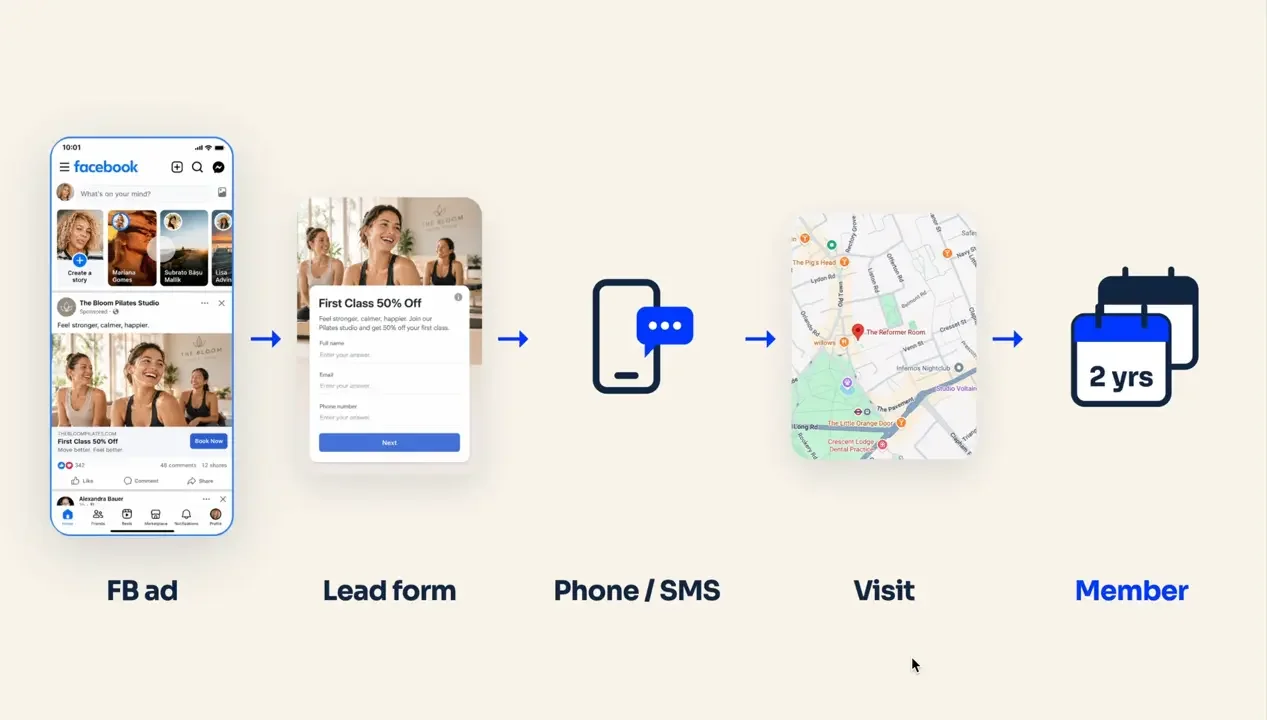
First, how does the funnel work?
- People see an ad on Facebook and click it
- That opens what’s called a lead form, also known as an instant lead form. They fill it out on Facebook itself. It doesn’t go to a website or anything like that
- The client calls or SMSes and follows up those leads
- Hopefully we book them in for a visit
- Then we try to convert them into long-term members, and this is where the real profit is
Think lifetime value, not cheap leads
I know it’s a lot of numbers, but when you spend money on ads, what we’re looking for is the lifetime value of a client. We’re not looking for the initial profit on the promotion that’s run in the ad itself.
For example, say you’re spending $1,500 US a month and people are completing the lead form for $30 each. What you want to see is that you’re converting them at each step of the way, high enough that the eventual lifetime value of those long-term members gives you a 3x plus return on your ad spend.
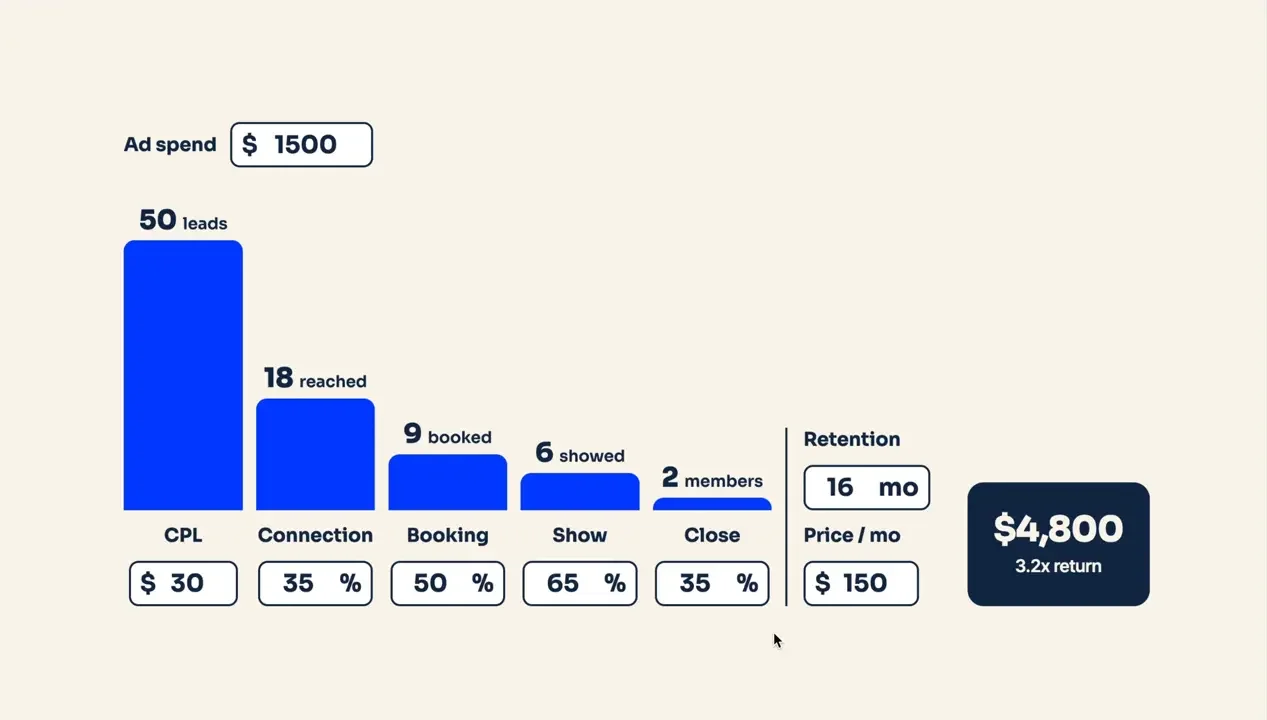
Which brings up an important point. When you think of leads, it’s not always the case that you want the cheapest leads possible.
- Cheaper leads: most of the time you’ll find the responsiveness is lower
- Leads with higher responsiveness: generally the price is much higher
So that’s something to keep in mind. (More on this in why your Facebook leads aren’t responding.)
Plan your offers around the year
To do this, we need an offer. Most people are familiar with a 1+1, a first free class, boot camps or challenges, that type of thing.
But you’ve got to think about it in the context of the year. There are different levels of demand at the beginning of the year, later in the year and in the middle, because of holidays and events.
For example, in the UK, July and August can be really challenging months to run a promotion with Facebook ads. People are on summer holidays, and it’s very difficult to get them to commit to something in person while they’re travelling around or managing kids.
This drives when you can actually run your promotions. It also drives the costs, because everybody else is running promotions at the same time. October, November and December, for example, costs start to rise because Black Friday is coming up in November, and everyone in e-commerce is bidding on Meta platforms as well.
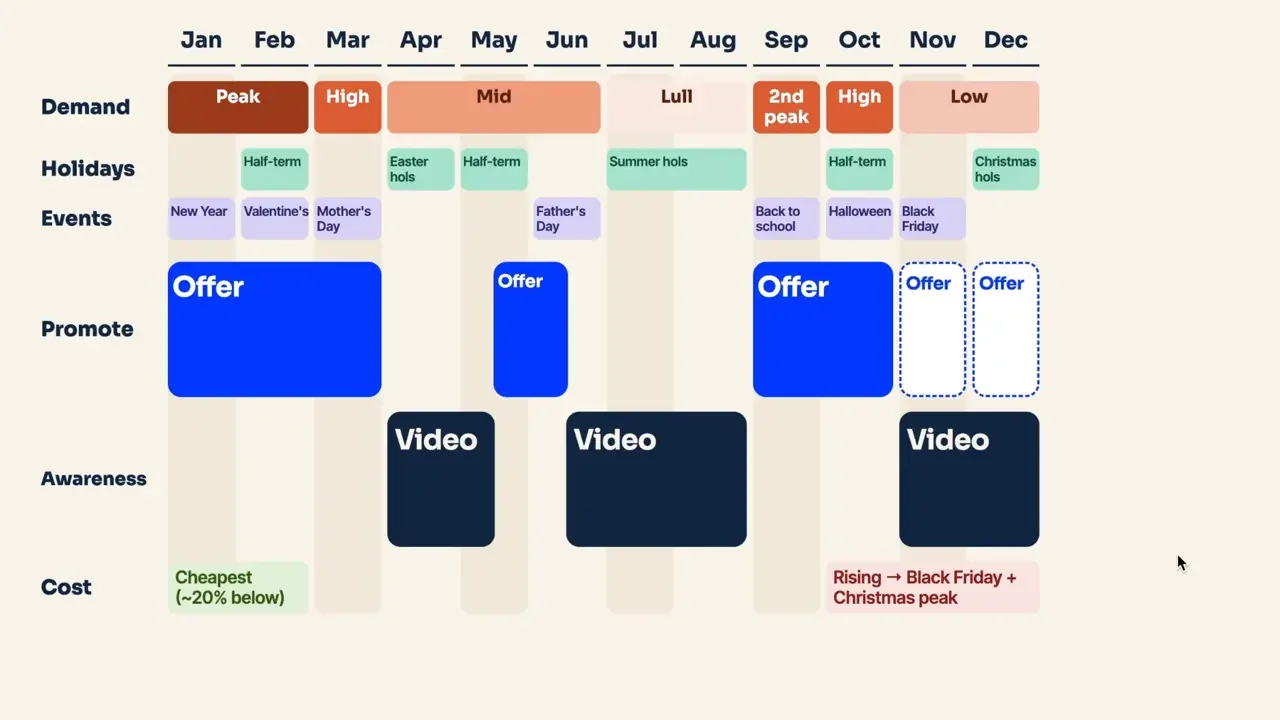
So you can’t run offers all the time. You can only run them on a schedule. If you try to run them all the time, you’ll still get leads, but they’ll be way more expensive. That’s why you can see periods in my original graph where lead volume is low, or there are no leads at all, because we’ve just turned the campaign off.
The hot and cold strategy
So what do you do in the months you’re not promoting? You run awareness campaigns. This is what I call a hot and cold strategy:
- When it’s warm, you promote and get people in
- When it’s cool in terms of demand (and sometimes temperature), you promote the facility itself, to build up the number of people who know about your studio and come there naturally without the ads
Match promotions to your market segments
Rather than picking promotion ideas at random, consider the market you’re in and who typically turns up to the studio. For example, you may find:
- 40% of people who join are a certain demographic, say women over 55
- You have a segment of parents who join after school
- School teachers join in certain periods
- And then a group of other people
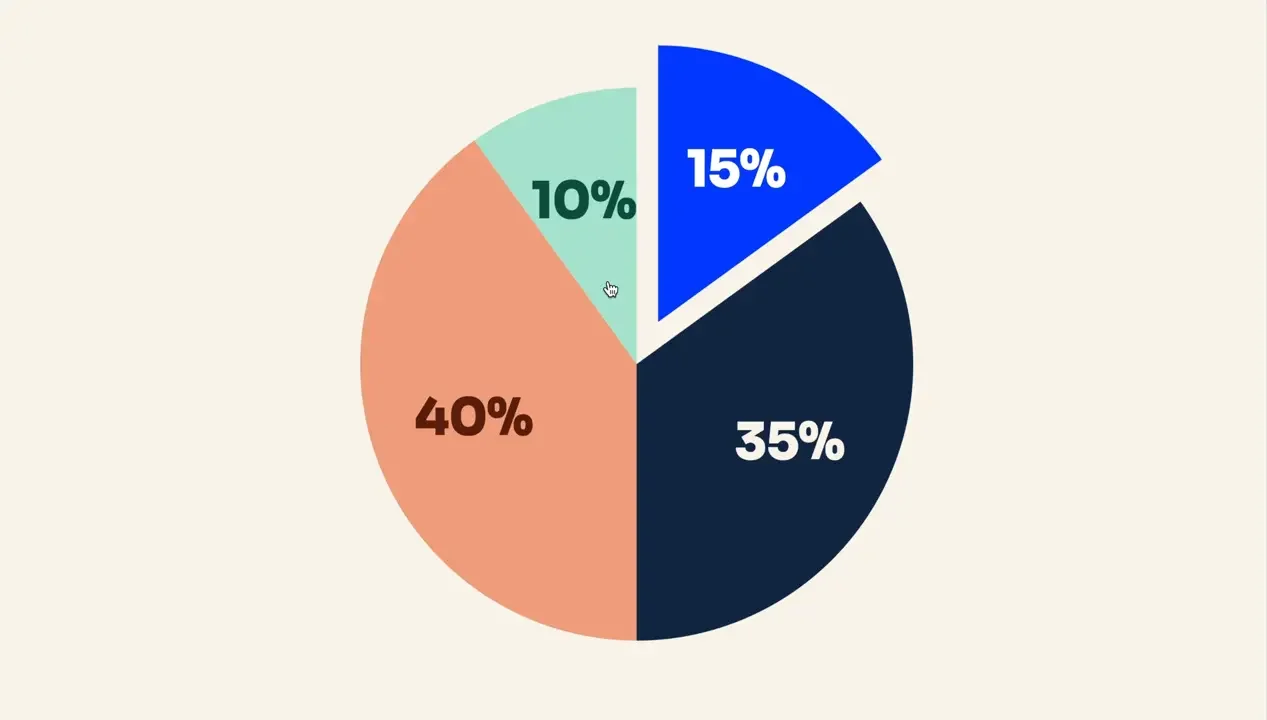
So you’re not only running promotions like the 1+1, the free first class or the challenges. You’re directing each one at one of these market segments. That reduces the overlap in your campaigns and keeps them fresh, while bringing in everybody you can, rather than advertising to the same group the whole year.
Setting up the campaign
Let me show you how to put the campaign together in Meta Ads Manager.
Campaign level: ad set budget
When you jump into your account, click the green create button, then click leads. Name it whatever you like.
Select ad set budget, and make sure “Share 20% of your budget with other ad sets” is not turned on.
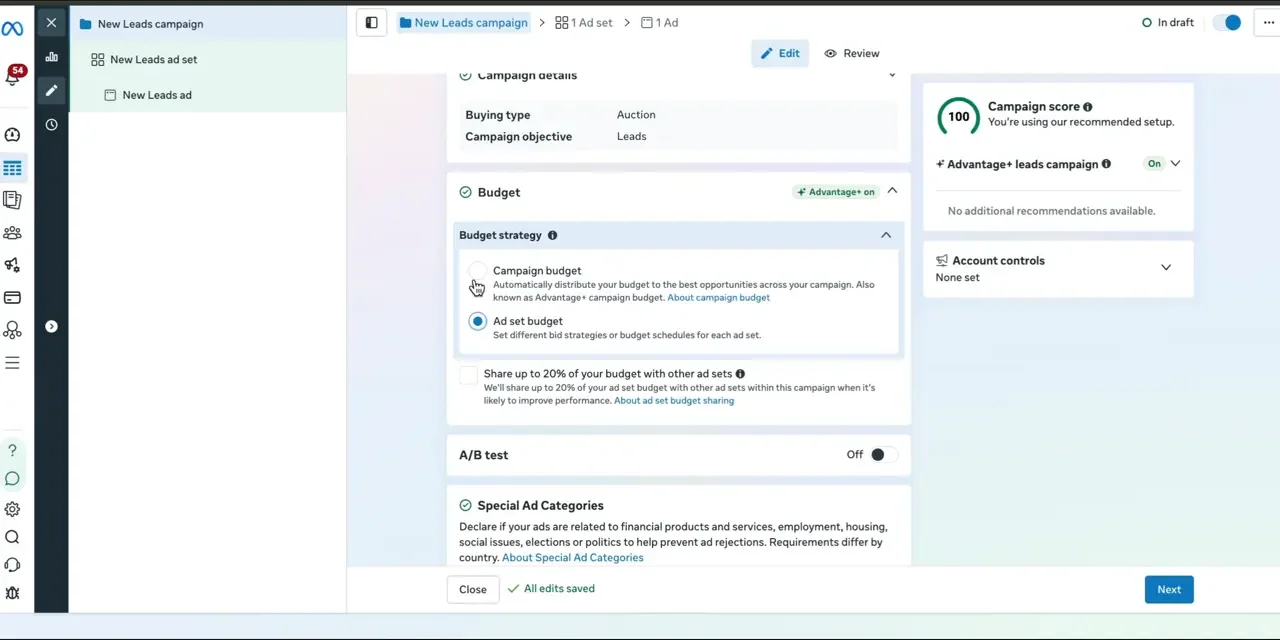
If you select campaign budget and you have multiple ad sets, Meta decides where to put the money for you. With ad set budget, you decide which ad set gets the money.
There’s a big debate about this. Some say campaign budget, because Meta knows better. Some say ad set budget, because control is better. In my opinion, most of the time ad set budget works better, because you don’t really need more than one ad set these days. And if you do, it’s for a specific reason, which means you want to control the budget on that ad set.
You don’t need special ad categories for this.
Conversion location: instant forms
For conversion location, choose single instead of multiple, and pick instant forms.
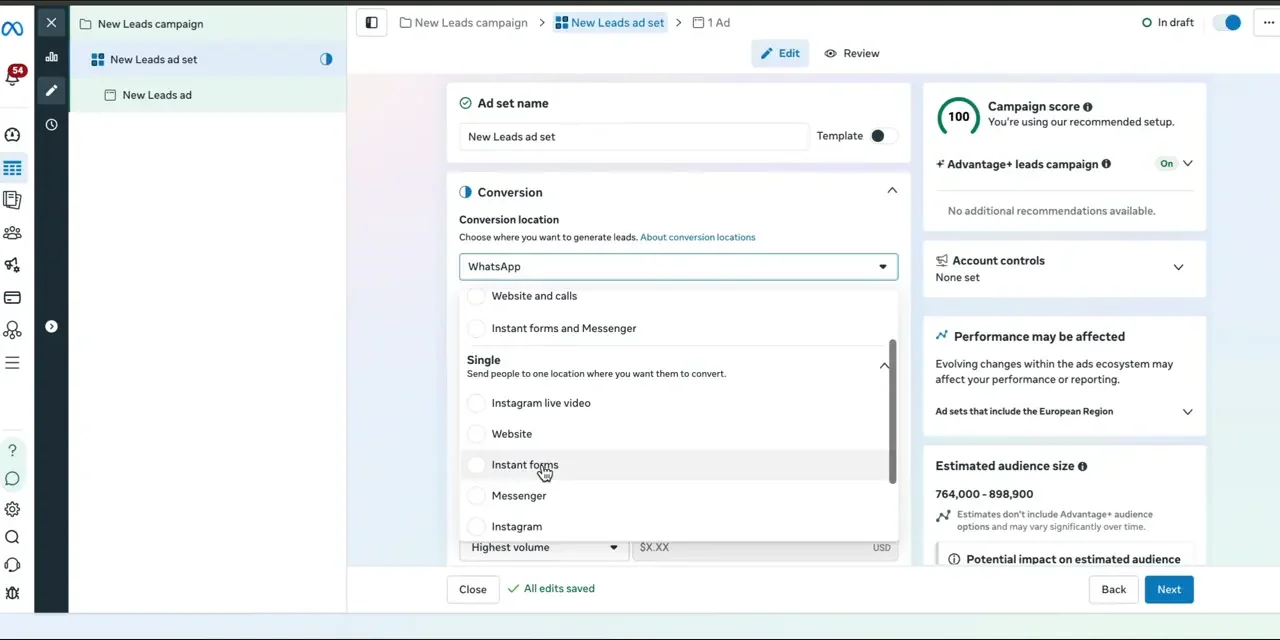
Make sure you have the correct Facebook page selected. If you control multiple accounts, it sometimes puts some random page in there, and you obviously don’t want it generating leads there.
Performance goal: maximise number of leads
There are two options here: maximise number of leads, and maximise qualified leads.
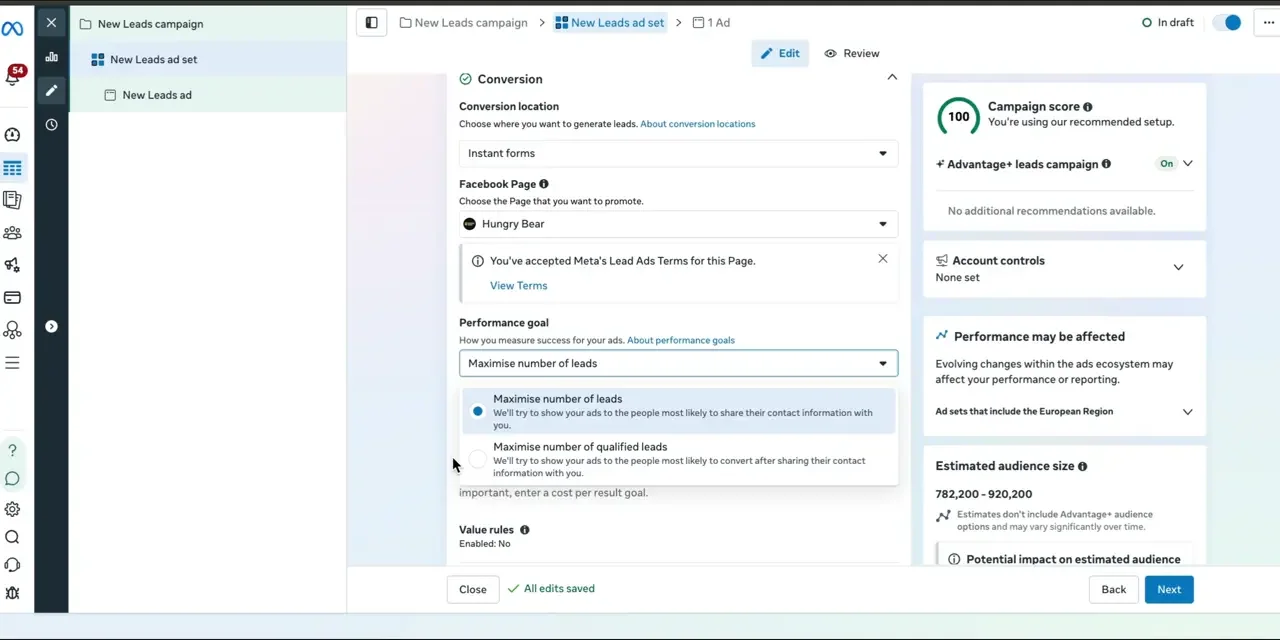
It sounds tempting to go with qualified leads first. But if you’re doing this for the first time, start with maximise number of leads, because you want the volume and the data to know what’s good and what’s bad. Later you can launch another ad set with its own budget, maximising for qualified leads, and compare the results.
Budget and schedule
For budget, I generally suggest aiming for at least $30 a day.
For the schedule, I’ve heard people argue you should start at midnight, 6am, whatever. If you had to pick a time, 6am is probably better.
Try not to launch on a Thursday or Friday. Better to launch on a Monday. Some people argue that launching on a Thursday or Friday lets you take advantage of the weekend, which may be cheaper. I personally find the opposite: weekends often perform worse. If you launch on a Monday or Tuesday, it’s more likely to perform well and pick up momentum faster. You can still launch on a Thursday or Friday if you want, it’s just probably not going to work as well in the beginning.
Audience: location
You have two options:
- Add the neighbourhoods or locations of your actual catchment area. This is what I do most of the time
- Or use a radius. If your studio was in South London, for example, drop a pin and keep the radius tight. The default covers most of London, so bring it down to around 2km, so it only covers people who’d actually travel to the studio
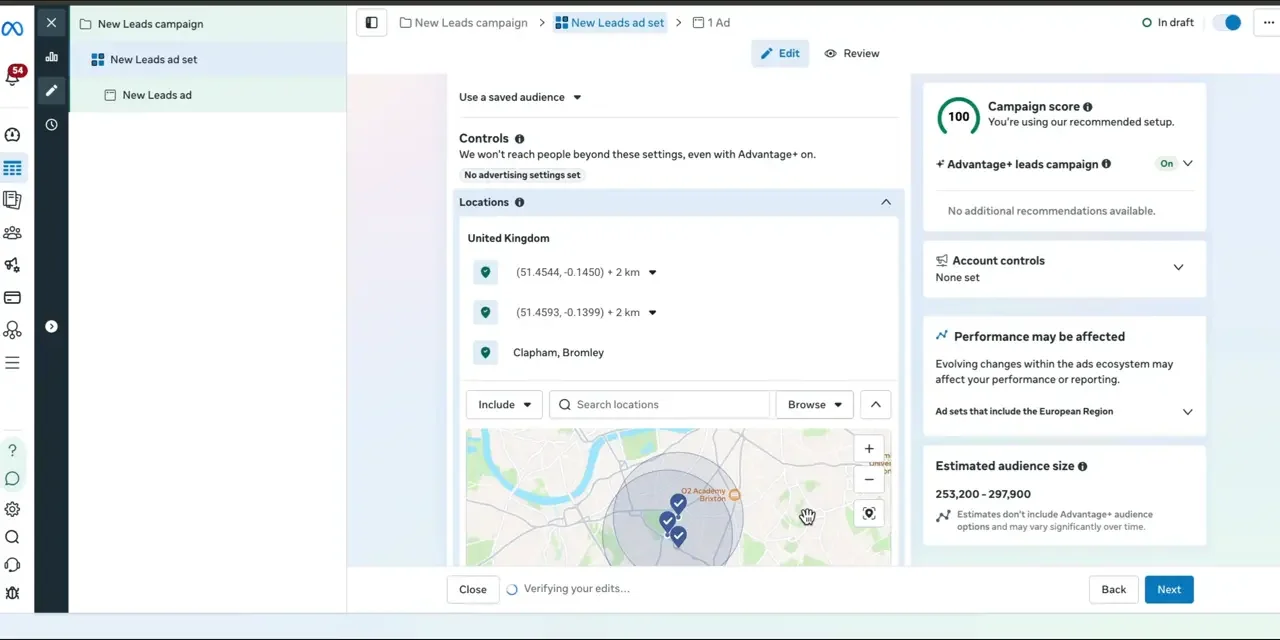
If the neighbourhoods aren’t listed in Meta’s targeting, I use the pin method and keep it as close and tight as possible. Multiple pins are fine, just don’t go crazy adding 10 plus. Stick to around three. Don’t make it too complicated for Meta.
Age, language and interests
Age. I don’t tend to use a minimum age. You can set it to 25 plus, but I often find that makes the leads more expensive without necessarily making them better quality. You can try it if you like, but I suggest leaving it at 18.
Language. I only use language targeting when the area I’m advertising in typically doesn’t speak English, or the language I’m advertising in. For London, or somewhere in the US or Canada, leaving it on all languages is very likely fine.
Interests. If it’s your very first time running promotions, you can add Pilates as an interest suggestion, just to give Meta a little hint. It’s not necessary these days. Only do it if the account is new. If you’ve run ads before, you don’t need it anymore.
Ad transparency only shows if you’re in the EU or a similar compliance area.
Placements: turn off Audience Network
If it will let you, click manual placements and turn off the Audience Network. That saves you from getting junk leads and wasting your time. You can leave the rest as is.
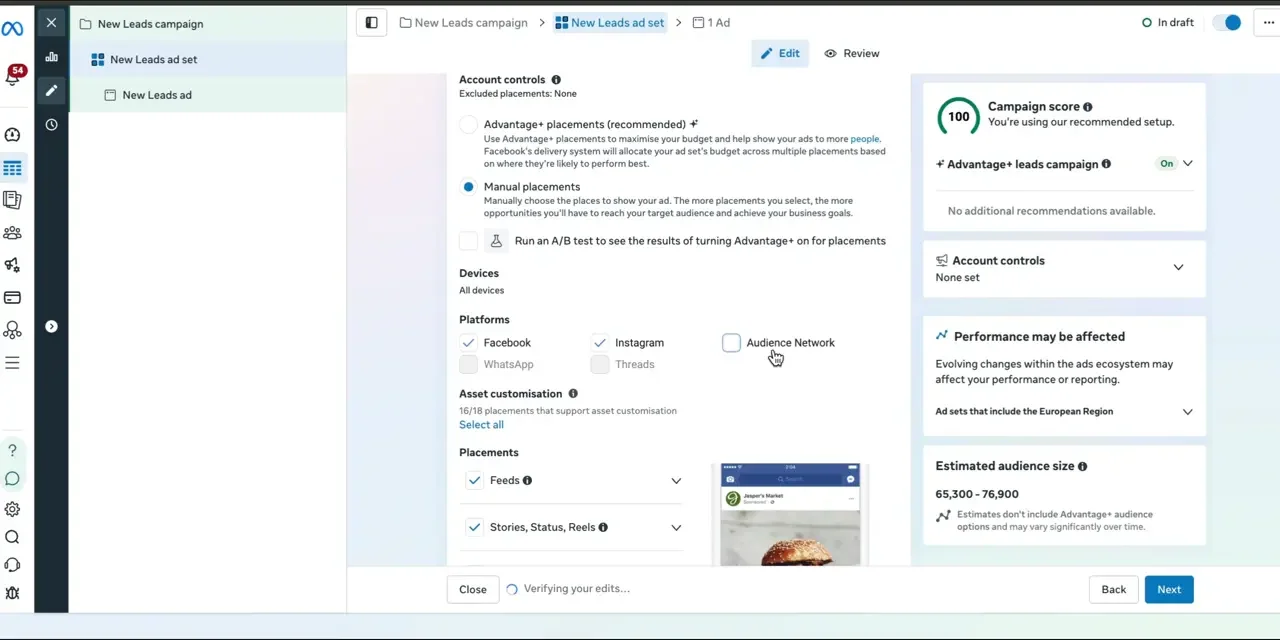
Also make sure “Allow limited spending to excluded placements” is switched off.
Ad level
Generally, aim for about five ads in your ad set. Duplicate the first ad four times. The “show existing reactions, comments and shares” option only matters if the ad has run before and already gained likes and comments, so it doesn’t matter here.
For the first ad, name it anything you like and, again, make sure it’s using the correct page. Under destination, choose instant form, then click create a new form. Don’t generate one. You’ll see why in a minute.
Setting up the lead form
Give the form a name so you remember what it was, like “1+1 January 2027”.
Form type: more volume
You’ve got two options: more volume and higher intent. Higher intent adds a step where people have to click and hold, or swipe, to submit. Meta keeps changing it. In my experience, it doesn’t really affect the quality or intent of the leads, so more volume is better.
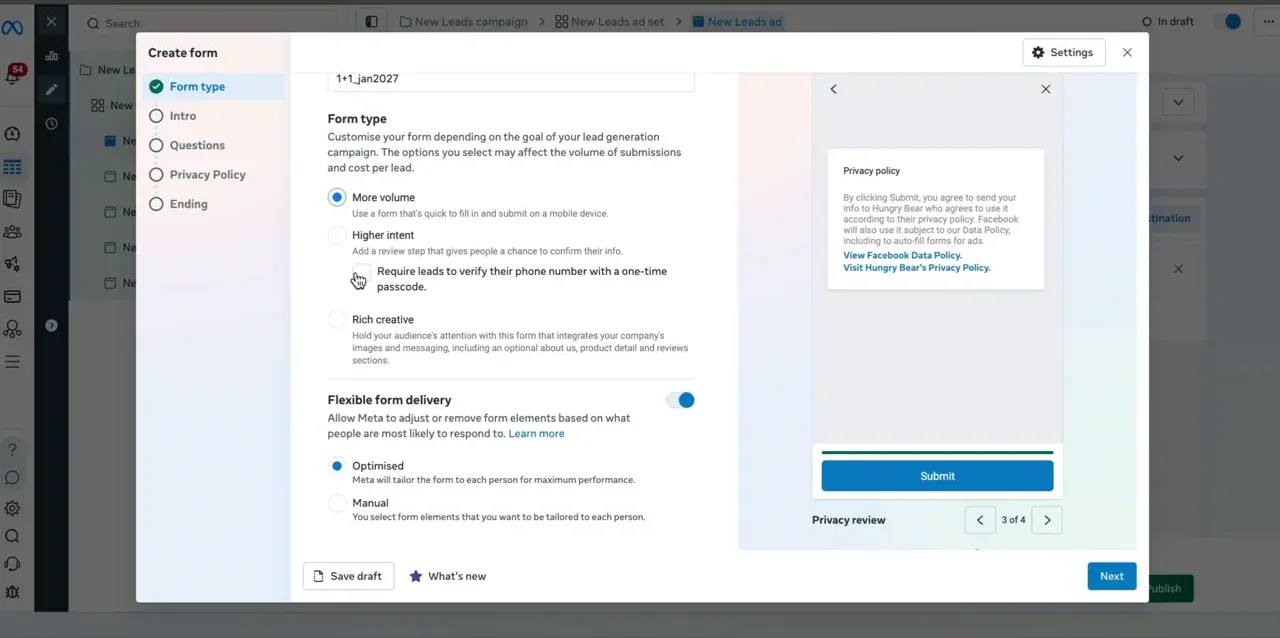
Under higher intent, there’s an option to require leads to verify their phone number with a one-time passcode. They’ll get an SMS code to enter before they submit. If you pick it here, it’s baked into a higher intent form.
But you can still switch on SMS verification on a more volume form. So creating a more volume form and switching on SMS later if you need it is better than creating a higher intent form, which gives you no benefit and has it baked in.
Flexible form delivery: off
Don’t turn this on. It says Meta will tailor the form for each person for maximum performance, which means it’ll remove questions and change the order of the questions you ask. You don’t want that, so leave it off.
Intro: background image and greeting
Always have the intro on.
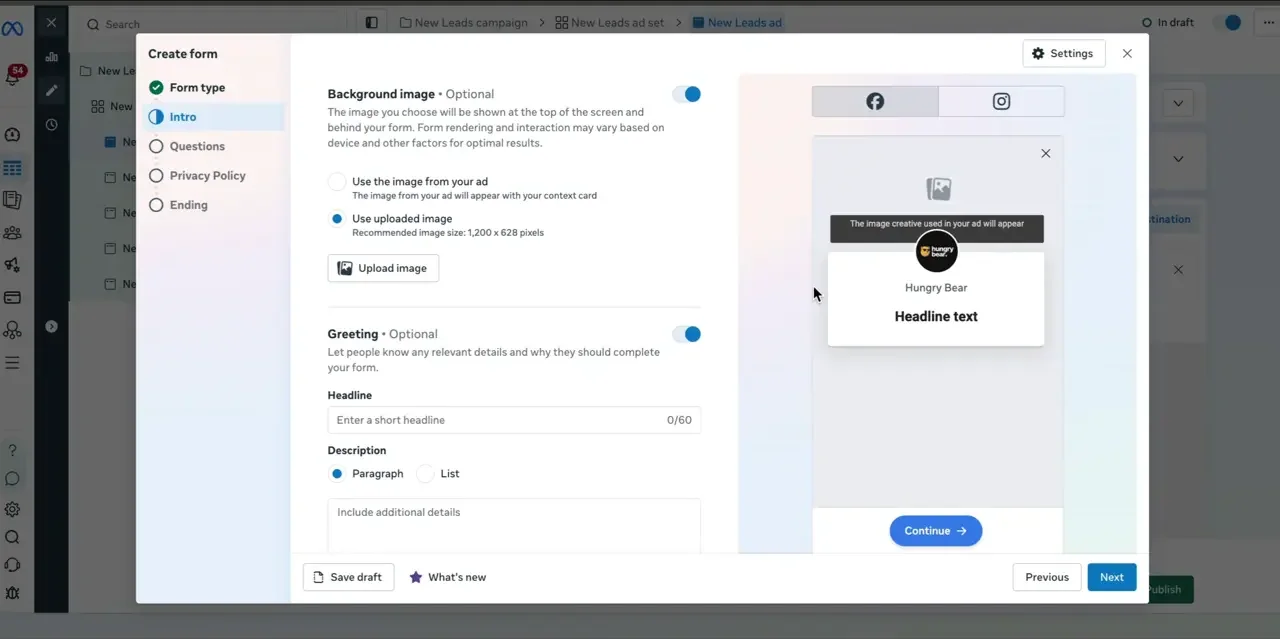
There’s a background image option. If you turn it on, it uses the image from your ad by default, or you can upload your own. It’s a little narrower than the 9:16 format, so if you upload one, put the offer again at the very top so people can still see it when they open the form. It’ll be slightly blurry, but it gives them one more touch point to remind them what they’re doing here.
For the greeting, I like to put what the offer is, like “First free Pilates class”.
For the description, you can use a paragraph or a list. A list gets cut off after the first two lines with a “show more”. A paragraph doesn’t get cut off. So I suggest the paragraph, especially if you’re a good copywriter.
Questions
For the questions, just go with the basics: name, email and phone number. You don’t need website. Don’t make phone number optional.
For the description, write it so it’s clear: “How can we contact you back?” That way, if anybody ever gets upset and asks how you got their details, you can screenshot it. It’s clear you’re going to contact them.
Then I add conditional questions, using multiple choice:
- “Are you interested in [your offer]?” Put yes first, and make yes submit the form and no close the form.
- Optional: “Can you commute to [your location]?” Again, yes submits the form and no closes it. If you add this, change the first question so yes goes to this question, otherwise it’ll just submit the form.
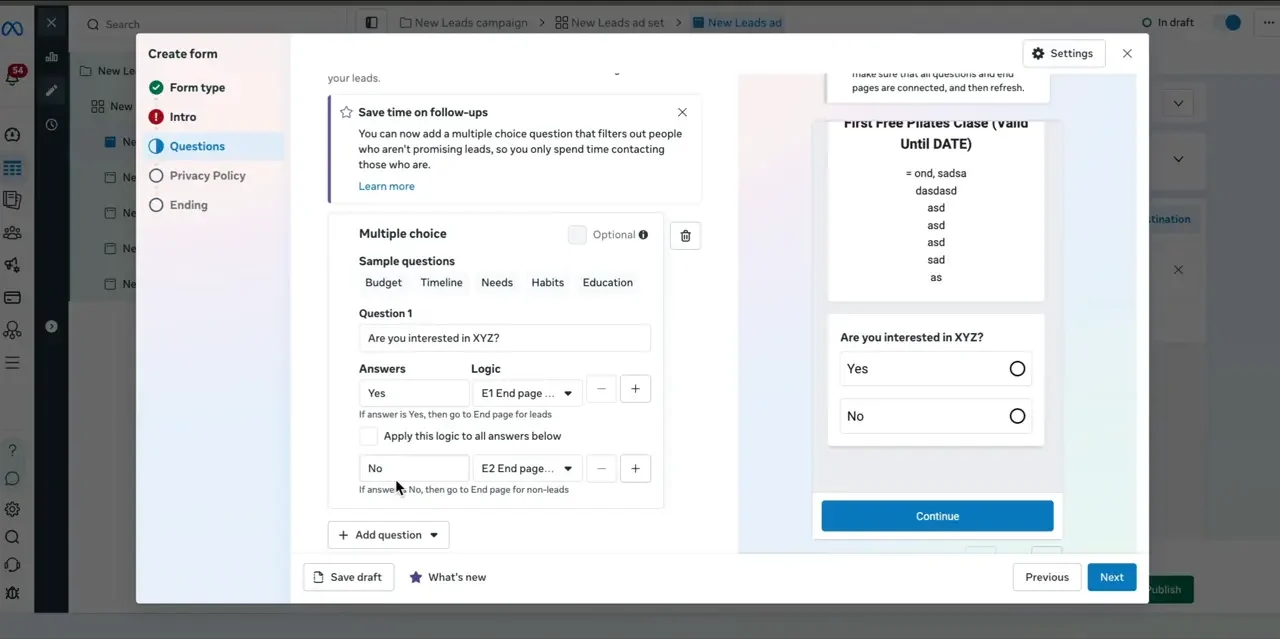
Why the first question? Sometimes when you’re scrolling Instagram, Meta opens the lead form by itself after a few seconds. I don’t know why it does that. It’s pretty annoying. Some people will submit the form just to get rid of it, because they don’t see the close button. This question gives you a clean way out for those people.
The commute question helps if leads tend to complain that the studio is too far away and they can’t get there.
Privacy policy and ending
If you have a website, you should have a privacy policy. Put the link in, and make sure it’s updated to account for Meta ads. Talk to whatever professional you need to get that done.
Because we used conditional questions, there are multiple end screens:
- For leads, say something like “We’ll call you from this number to book in your first free class”, or whatever the promotion is
- For non-leads, I sometimes leave Meta’s default wording, because at least Meta can’t be upset at me for it
In both cases, you can change the link to your Instagram or your booking page. Then click create form.
A quick aside on images
If we have these two images, which one would you suppose performs better?
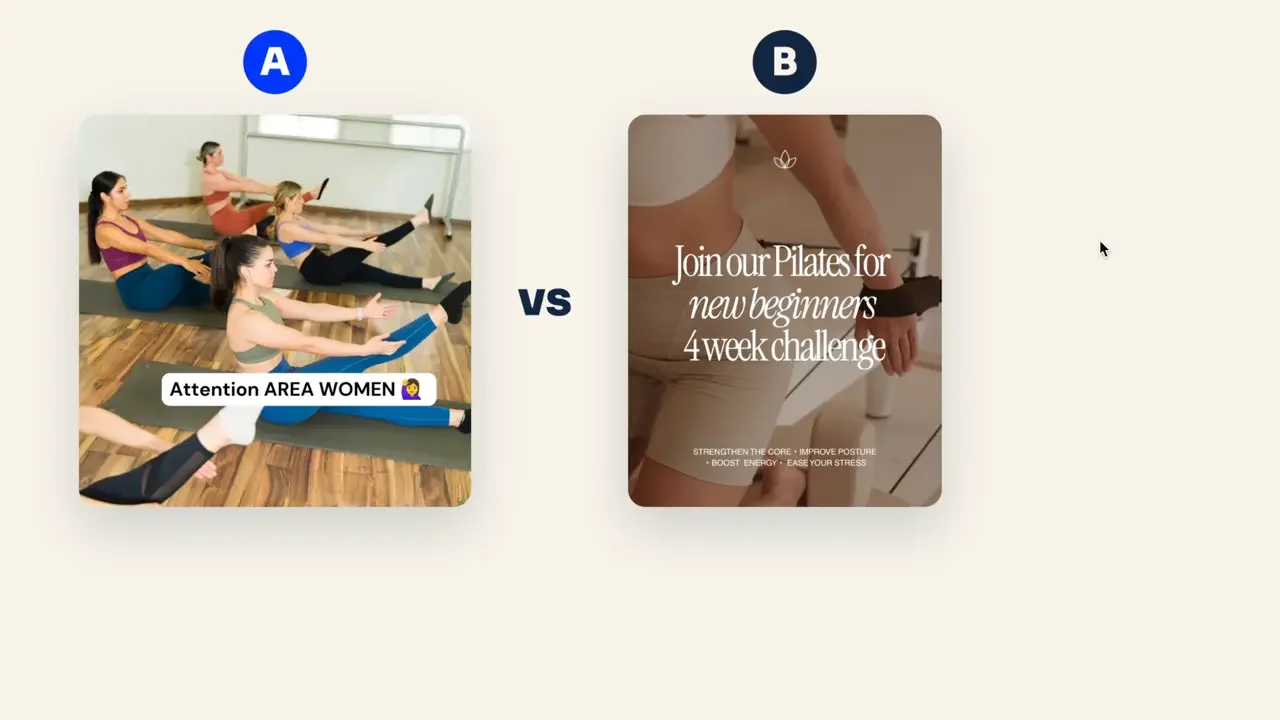
Many people would pick B, because it’s more professional and polished. But you may be surprised: it’s actually A.
- It’s clearly a local business
- It uses real people
- It has a call out
B looks a bit too polished. It’s stock photography, and there are too many things to read.
So your ad creatives don’t need to be the best-looking art pieces. Often, ads that don’t look like ads perform best. Think about what you naturally see on social media from people. That’s often a great place to start.
For ad copy, there are a million ways to write it, and that’s a topic for another video (or see these Facebook ad copywriting tips).
For tracking, you don’t need CRM events unless you have a dedicated CRM like GoHighLevel. You don’t need website, app or offline events either.
Once you have five images, or three images and two videos, plus the copy, you can publish the ads.
Managing leads in Lead Center
Once the ads are running, leads populate in Lead Center. You can Google “Meta Lead Center” to find the link, or find it in the all tools menu on the left-hand side.
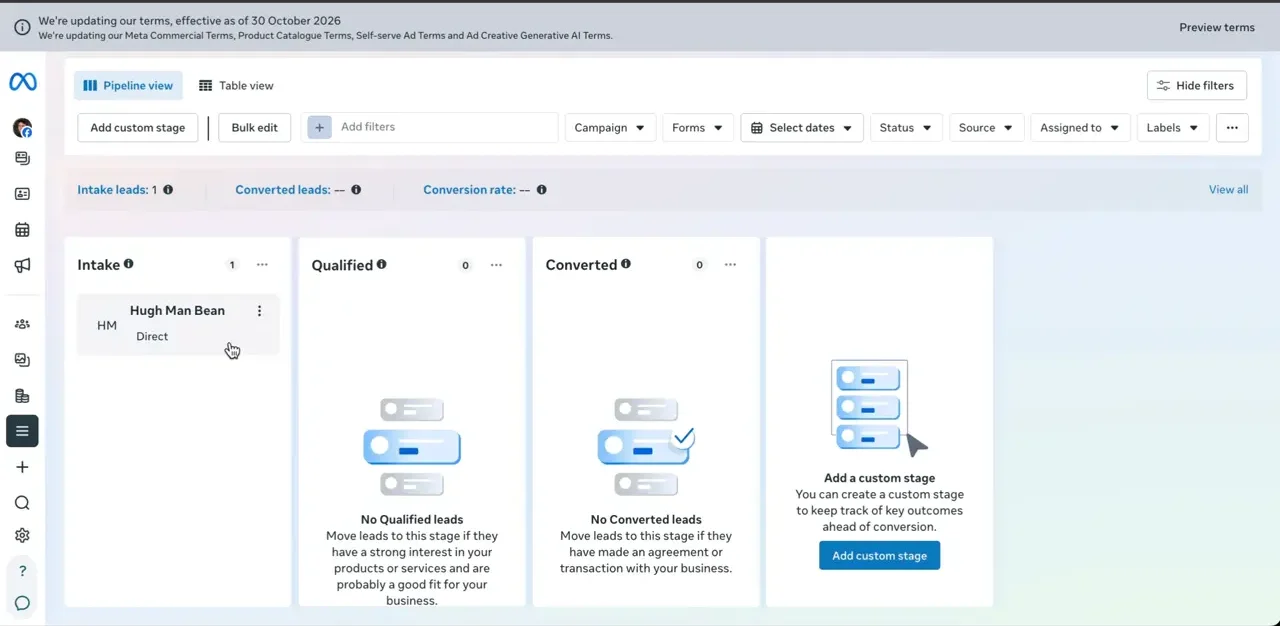
As leads come in from your ads, they land in the intake column. Don’t forget to move them to qualified and converted.
Remember the ad set setting where we could switch to maximise qualified leads? Get the volume in, get a good number of people marked as qualified, and then test a maximise qualified leads campaign later. It also helps you organise your leads if you don’t have a dedicated CRM.
Quick final tips
- Revenue. It’s going to be difficult to run the ads if your studio is currently under $30,000 US a month in revenue. At that size, the studio doesn’t quite have the resources to run ads in a way that’s not stressful
- Time. If you’re in a real hurry for results, this may not be the right match. Building the promotional calendar, matching it to the right audience, finding the right offer for that time of year and getting good at managing leads all take time
- Call-back team. Have a reception or call-back team primed and ready. This makes it very difficult for solopreneurs, because if you can’t call the leads back within 5 minutes, sometimes it’s not even worth it. The response rate will be so low
- Calendar. Be prepared to work out that calendar. You can’t run one offer the whole year. It needs to be a sequence of offers if you want the highest return on your Meta ad spend
- Speed. Again, make sure you can call the leads as fast as possible
So that’s the playbook from start to finish.